
Skip to content
wp encryption ssl

WP Encryption

WordPress SSL Plugin

  • ChatGPT AI Content Writer WordPress Plugin
  • Cookie Policy
  • DOCS
  • Hire WordPress SSL Expert
  • Introducing Cert Panel
  • My Account
  • Pricing
  • Refund Policy
  • Sitelock Monitor Features
  • Terms and Conditions
  • Thank You
  • WordPress Mixed Content Scanner
  • WordPress SSL Solution
  • WP ENCRYPTION CDN

ERR_SSL_UNRECOGNIZED_NAME_ALERT – WordPress on Hostgator / Bluehost

Home > Docs > ERR_SSL_UNRECOGNIZED_NAME_ALERT – WordPress on Hostgator / Bluehost
Note: Modifying server config files via SSH console is a complicated process and may break your site if not done perfectly. If you are not an SSH expert, We highly recommend upgrading to PRO version and let our premium support handle / help with this server setup.

ERR_SSL_UNRECOGNIZED_NAME_ALERT is one of the most common error you could face due to mis-configuration of SSL. Firstly, we suggest you check your site SSL on SSLLabs.com to make sure there are no critical SSL issues. If so, your hosting support or SSL provider should be able to fix the issue easily.

Some hosting users might notice ERR_SSL_UNRECOGNIZED_NAME_ALERT error after successful SSL installation. Please follow below given instructions to get rid of the issue right away:

  1. Generate & install free SSL certificate using “WP Encryption” WordPress SSL plugin if SSL certificate is not yet installed on your site.
  2. Login to Control Panel of your hosting.
  3. Click on “Sitelock” feature and disable the feature.
  4. Back to Control Panel (cPanel), go to Advanced DNS Editor / Zone editor.
  5. Scroll to very bottom of the page and you will notice A & CNAME records.
  6. Please update these 2 DNS records as below:
    1. “A” record should point to IP address used in your other DNS records like autoconfig, whm, autodiscover, etc., or your original server IP address.
    2. “CNAME” record with name “www” should point to your non-www domain.
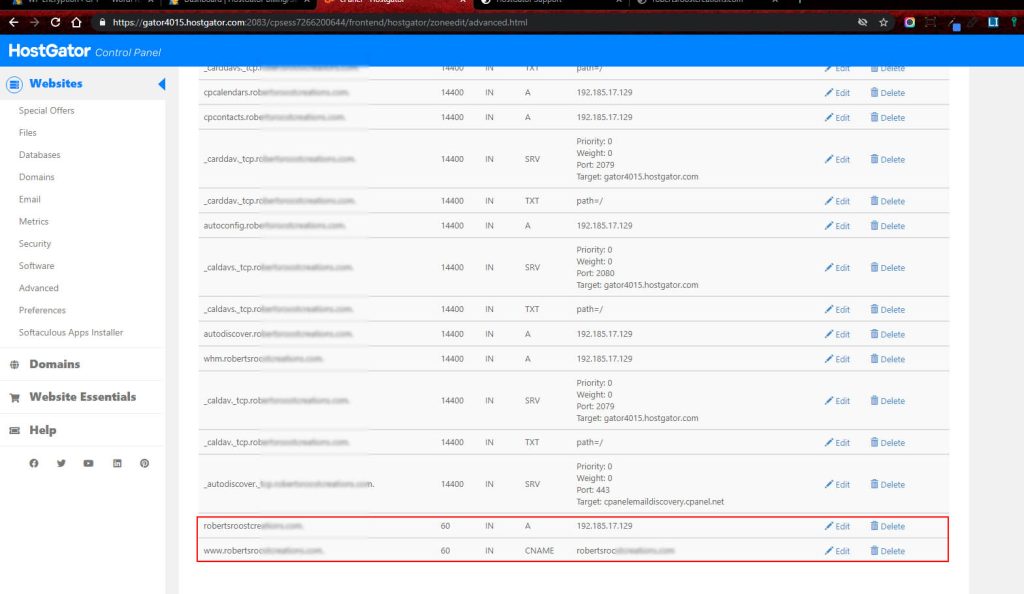
err_ssl_unrecognized_name_alert

6. Once after you update these DNS records, please wait few minutes and your HTTPS site should start working perfectly with secure padlock!.

Post navigation

How to install SSL for OpenLightSpeed server – WordPress
Trouble Installing SSL Certificate on Bluehost Site

The Ultimate SSL Plugin for WordPress Security!

Upgrade to WP Encryption Pro and enjoy hassle-free SSL installation, SSL renewal, advanced security, vulnerability scanning, login protection & much more!.

UPGRADE

Archive

  • What is X-Frame-Options and How To Use It?
  • Parse Error Reading JWS Error
  • Permit WordPress to Reload Apache2 Server Gracefully
  • Private Key Doesn’t Appear To Be Valid on Google Cloud
  • Restrict Private Key Access on Nginx Server

Categories

  • Apache
  • Bitnami
  • DOCS
  • Linux
  • Nginx
  • OpenLightSpeed
  • Plesk
  • SSL Error
  • Ubuntu
  • Uncategorized
  • WHM
  • WordPress

Tags

AWS Bluehost browser chrome compatibility Digital Ocean ERR_TOO_MANY_REDIRECTS Hostgator HTTPS Linux Mapped Domains Multisite SSL webadmin WHM

© 2020-2026   | Terms & Conditions | Refund Policy | Premium Support | Hire SSL Expert | Docs | My Account

We use cookies to give you the best experience on our website. By continued use of site, you accept all the cookies.

You can find out more about which cookies we are using or switch them off in .

wp encryption ssl
Powered by  GDPR Cookie Compliance
Privacy Overview

This website uses cookies so that we can provide you with the best user experience possible. Cookie information is stored in your browser and performs functions such as recognising you when you return to our website and helping our team to understand which sections of the website you find most interesting and useful.

Strictly Necessary Cookies

Strictly Necessary Cookie should be enabled at all times so that we can save your preferences for cookie settings.

3rd Party Cookies

This website uses Google Analytics to collect anonymous information such as the number of visitors to the site, and the most popular pages.

Keeping this cookie enabled helps us to improve our website.

Cookie Policy

https://wpencryption.com/cookie-policy/